
PRIVATE PHOTO VAULT® HELP
Questions Wey People Dey Ask Often
Find answers about passwords, photos, backups and purchases. Start here before you contact support.
I fit recover my password?
If you set recovery email when you first use Private Photo Vault®, you fit use am recover your app or album password. Without recovery email, this method no fit recover those passwords.
To recover the main app password
- Enter wrong app password eight times one after another.
- When password recovery message show, choose Yes.
To recover album password
- Enter wrong album password five times one after another.
- When password recovery message show, choose Yes.
These steps na for app and album passwords, no be your separate Cloud Vault password. Options fit differ by app version. No uninstall the app to reset password; you fit lose files wey dey only inside the app.
I wan get new phone. How I fit move Photo Vault go the new phone?
Cloud Vault (we recommend am)
- Update to latest app. Open Settings → Cloud Vault and set your account. Cloud Vault na optional Premium feature.
- Let the backup finish.
- Open Private Photo Vault® for your new device and sign in to Cloud Vault. Make sure say you get your Cloud Vault password.
Back up your iPhone or iPad for computer
- Connect old device to computer and make backup with Finder, Apple Devices or iTunes, depending on your computer.
- Restore that backup for your new device.
Apple backup instructions explain the options. Our older instructions mention iTunes; Apple now also use Finder and Apple Devices.
Some customers don report problems to restore Private Photo Vault® data through iCloud device backups. Use completed Cloud Vault or computer backup, and check your files for new phone before you remove dem from old phone.
I reset my phone. I fit restore my photos?
Cloud Vault (we recommend am)
If Cloud Vault dey on and your files finish uploading before the reset, sign in through the app to open that backup.
Back up your iPhone or iPad for computer
If you make device backup wey contain your vault before the reset, you fit restore am with Finder, Apple Devices or iTunes. Follow Apple restore instructions. Device restore fit replace current data, so read Apple instructions first.
Some customers don report problems to restore vault data from iCloud device backups. Recovery need usable backup wey already dey; sign-in no fit restore files wey never get backup.
Wetin happen when my subscription expire?
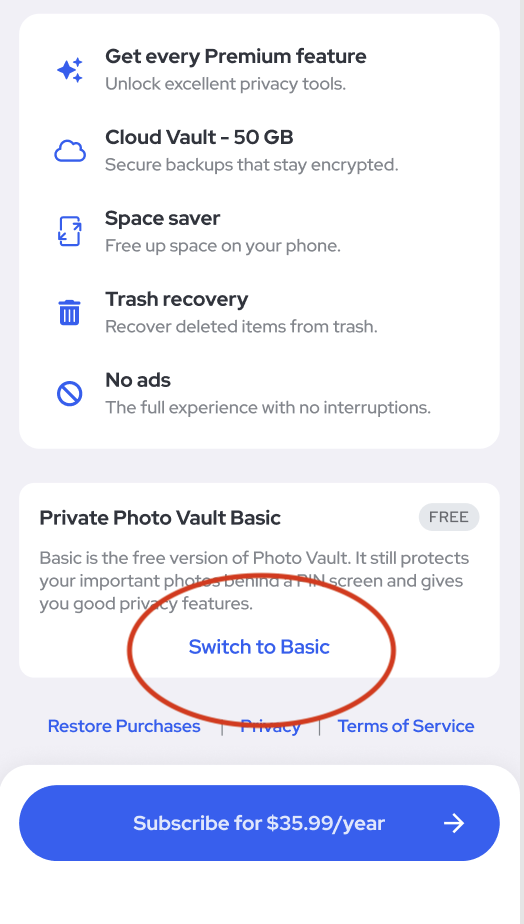
The “Premium has Expired” screen let you renew or switch to Basic free. Scroll down for that screen and tap Switch to Basic.
Basic still protect your photos with PIN. You fit still open photos wey dey the app, but dem go delete your Cloud Backup. Check your files and backup options before you switch.
My app disappear. Where e go?
- You fit don remove the app from Home Screen. For iPhone, swipe pass the last Home Screen page and check App Library.
- If na the separate Pro version you get, look for app wey dem name SV. Dem change that version name and icon.
I delete the app from my phone. I fit recover my data?
To delete the app remove the photos and videos wey e store from your phone. Recovery fit work if you already get backup:
- Cloud Vault: if you turn am on and files finish uploading, sign in through the app and download your backed-up data.
- Computer backup: if iPhone or iPad backup contain your vault, follow Apple instructions to restore am.
Without usable backup, we no fit restore deleted files. If photos dey missing, contact us before you delete or reinstall the app.
I buy am for my iPhone. I fit get am free for my iPad?
Yes. Restore your purchase for other Apple devices with the Apple Account wey buy am. Inside Private Photo Vault®, go Settings and tap Restore Purchase.
Which video formats Private Photo Vault® dey support?
Private Photo Vault® dey support .mov and .mp4 files.
Private Photo Vault® need location access?
Features wey depend on location use location access, including location details for Break-in Report and Location Based Lock. You no need turn these features on before you fit store private photos and videos for the app.
I don buy Pro. Why adverts still dey show?
Open Settings inside Private Photo Vault® and tap Restore Purchase. Make sure say na the store account wey buy am you dey use. If adverts still dey, contact support.
Who fit see my photos?
Our team no fit see the photos or videos inside your vault.
When Cloud Vault dey on, your key encrypt files for your device before dem reach our servers. Read how Cloud Vault dey protect your files.
When Cloud Vault dey off, vault files stay for your device. If you turn on iCloud device backup, copies of your encrypted vault files fit also dey Apple servers.
I fit recover my Cloud Vault password?
No. Your Cloud Vault password no dey go our servers, and our team no fit recover am. E different from your app passcode. Keep safe record of am.
Private Photo Vault® dey secure?
Private Photo Vault® use AES-256 encryption to protect your data. You fit also choose vault passcode wey different from your phone code. See privacy and access controls.
Cloud Vault dey secure?
Your photos and videos already dey encrypted for the app. Cloud Vault add another encryption layer for your device before upload, with key wey come from your Cloud Vault password. Our team no fit see that content. Read more about how Cloud Vault encryption dey work.
Wetin be Photo Vault?
Private Photo Vault® na encrypted app to lock and store private photos and videos for iPhone and Android. You fit use the device vault without account, offline by default.
How I fit cancel my subscription?
Cancel through the store where you subscribe:
- Apple instructions to cancel subscription for wetin you buy for App Store.
- Google Play instructions to cancel subscription for wetin you buy for Google Play.
To delete the app no dey cancel subscription. Before you change plan, read wetin happen when Premium expire.
NA YOUR PHOTOS. NA YOUR PRIVACY.
Lock your photos and videos.
Download am free for iPhone and Android.

